Tree supports use less filament, scar the model less and usually snap off by hand, while normal supports carry more load and hold up better under wide flat overhangs. Neither one wins every shape, and the practical answer is that organic forms get trees and load-bearing geometry gets normal supports. That is the rule most people on the print forums follow by default, and this guide breaks down tree supports vs normal supports in slicers, where each one wins and where each one breaks down.
Both types are generated automatically by your slicer. It drops support wherever the model crosses the angle you set as the support threshold, and the difference is only in the geometry it builds to do that job. Updated for 2026, the setting names below cover Cura, PrusaSlicer, Bambu Studio, OrcaSlicer, Lychee and Chitubox.
Table of Contents
- Tree Supports vs Normal Supports in Slicers at a Glance
- What Are Normal Supports in a Slicer?
- What Are Tree Supports in a Slicer?
- How Do Tree Supports vs Normal Supports Affect Surface Quality?
- How Do They Compare on Print Time and Material Use?
- Tree Supports vs Normal Supports: Strength and Overhang Support
- Which Support Type Is Easier to Remove?
- Slicer Settings and Printer Compatibility
- Cura
- PrusaSlicer
- Bambu Studio and OrcaSlicer
- Lychee and Chitubox for resin
- The settings that decide whether supports come off clean
- Which Should You Choose?
- Frequently Asked Questions
- Are tree supports stronger than normal supports?
- Do tree supports use less filament?
- Do tree supports make prints faster?
- Can I use tree supports for functional FDM parts?
- Why do tree supports leave fewer marks than normal supports?
- How do I choose between tree and normal supports in my slicer?
- Conclusion
Tree Supports vs Normal Supports in Slicers at a Glance
Here is the short version. Read the table, then jump to the section matching the problem you are actually solving.
| Criterion | Tree supports | Normal supports |
|---|---|---|
| Shape | Branching trunks that merge upward from the build plate | Solid block, slab or grid rising directly under the overhang |
| Material used | Low, most of the time by a wide margin | High, and it scales with the size of the overhang area |
| Print time | Shorter, because there is less geometry to lay down | Longer on the same model, though not always by much |
| Surface scarring | Minimal, contact happens at small tip nodes | More marks over a broad contact patch |
| Load capacity | Limited, small branches deflect over long spans | High, solid columns resist downward weight |
| Ease of removal | Usually one finger, sometimes pliers | Longer job, more flush cutters |
| Reaching into cavities | Poor, trunks cannot fit narrow holes | Better, a block can be generated anywhere |
| First-layer reliability | Thin tips can lift or fail to appear | Very reliable, wide footprint grips the plate |
| Best for | Figurines, busts, organic shapes, visible faces | Large flat shelves, flat-on-plate bases, long spans |
| Worst for | Wide flat overhangs, thin-wall models, print time budget | Visible surfaces, tight cavities, filament cost |
One note before you read further: names differ between slicers. Cura calls them Normal and Tree, PrusaSlicer calls them Normal and Organic, and Bambu Studio and OrcaSlicer follow the same two names as Cura. Lychee and Chitubox use Normal and Tree as well, for resin.
What Are Normal Supports in a Slicer?
Normal supports are the default geometry almost every slicer ships with. The slicer builds a slab, grid or set of vertical pillars straight up from the build plate, or off the model itself, and fills the space under any surface steeper than your support angle threshold. The result touches the model across the entire underside of the overhang rather than at a few points.
That broad contact is the whole trade. A dense column of plastic under a shelf holds the weight of the print as it builds, and the same geometry can be dropped into a narrow hole where a tree trunk will not fit. The cost is filament, time and the sanding work afterwards, because every square millimetre of that slab leaves a witness mark when you pull it away.
Printers handle them well. The first layer is a wide footprint that grips the plate, so supports almost never detach on their own. If you only ever print one support type, make it this one. It is the forgiving default, and it is what people on r/3Dprinting fall back to whenever a model gets complicated.
What Are Tree Supports in a Slicer?
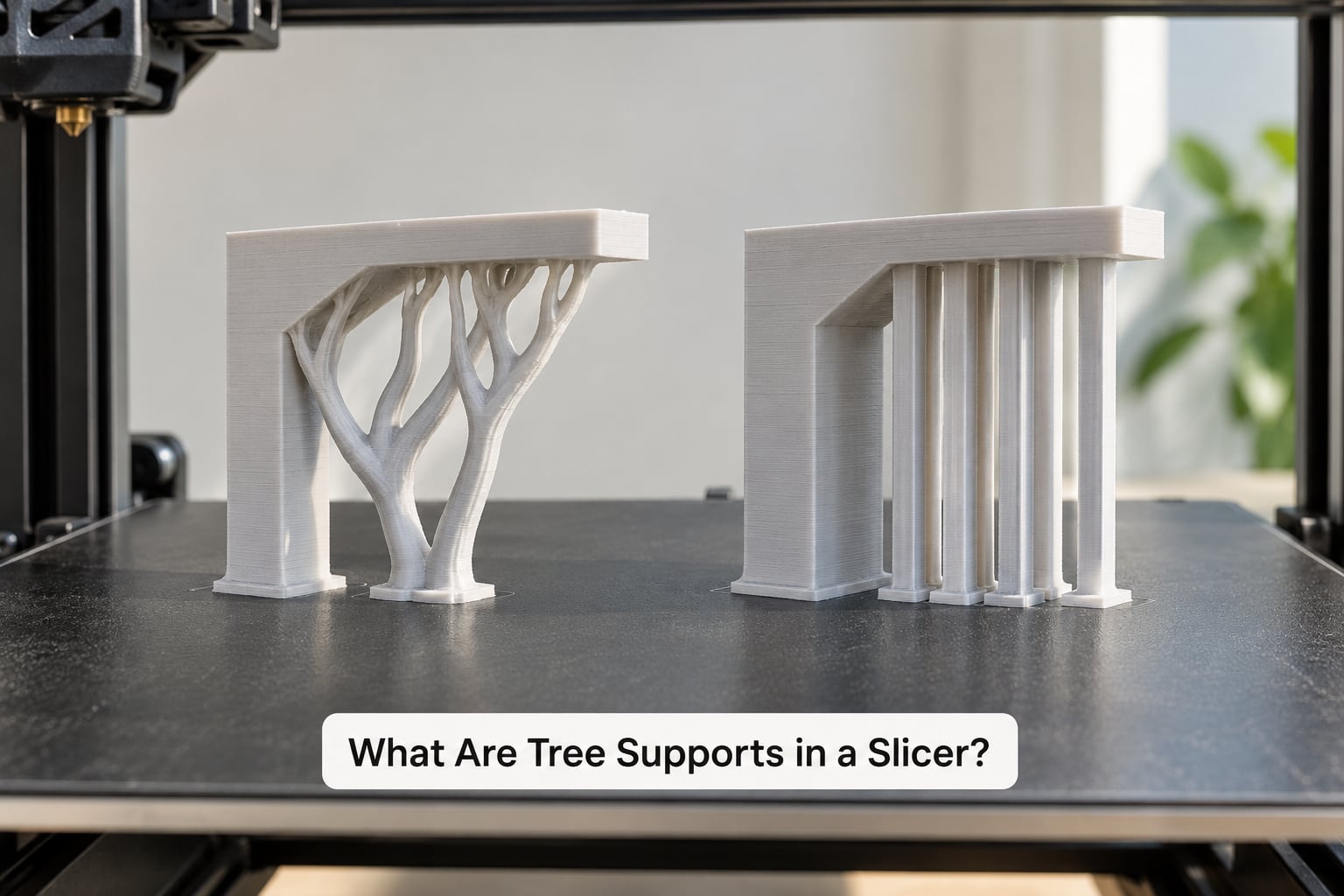
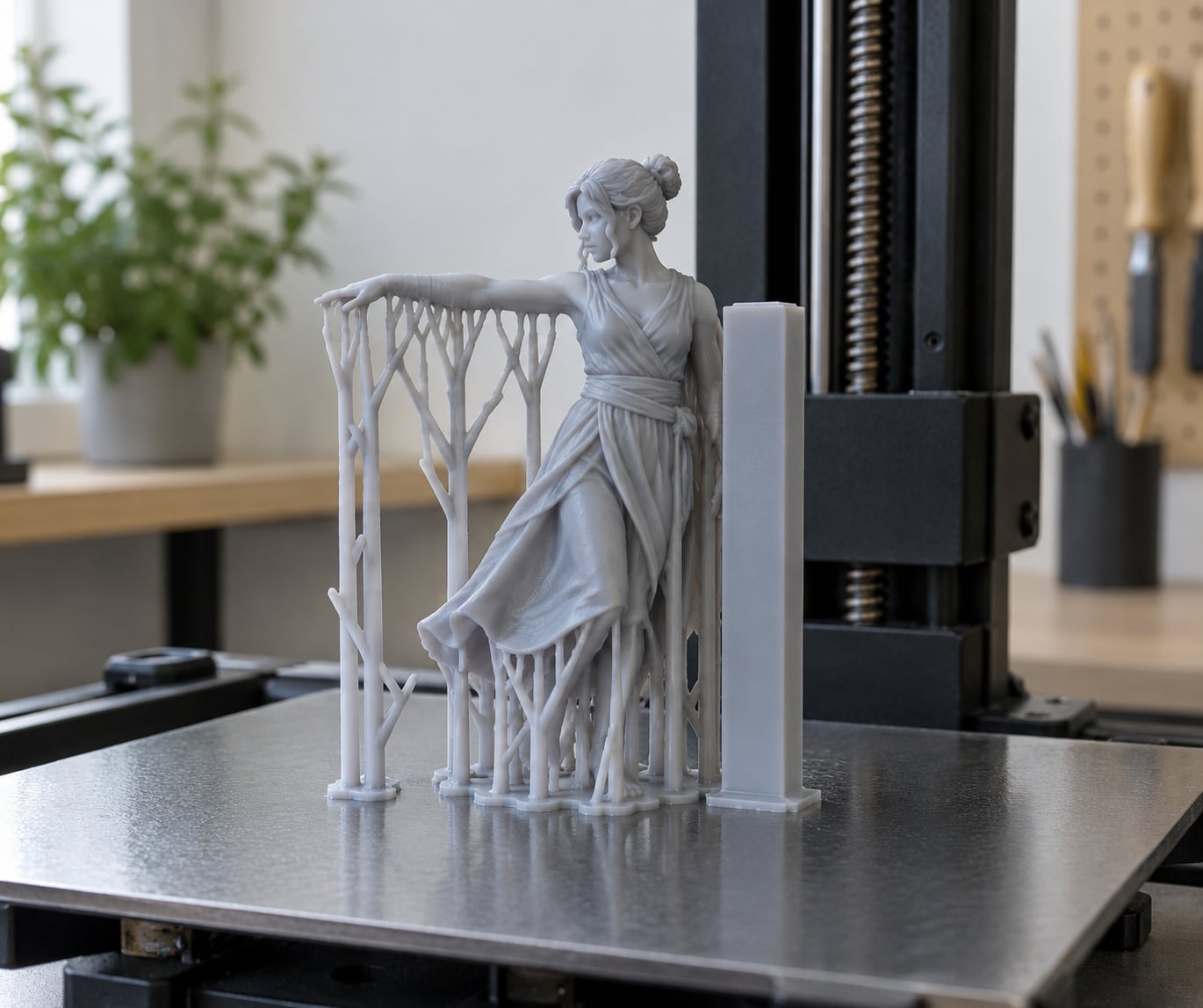
Tree supports, called organic supports in PrusaSlicer, grow upward from the build plate in branching structures. Thick trunks near the plate split into thinner branches, then thinner again, and each branch ends in a small tip node that touches your model. Nothing sits directly under the overhang except that node, so the model hangs off a handful of small contact points instead of a slab.
Because branches merge as they rise, the material usage stays low and the structure still has a load path back to the plate. Most slicers also offer style variants: Tree is the balanced default, Organic is looser and cheaper, Slim is thinner and taller, and Strong uses more branches for heavier loads. One behaviour surprises people the first time they see it: past a certain diameter the branch deliberately thickens to stay strong while cutting material. That is by design, not a bug.
There is a caveat that catches out beginners. Normal supports print at the layer height of the model, but slim tree styles often get printed with a reduced or constant layer height, so a tall tree can be taller than the slicer predicted. Users on the Bambu Lab forum have reported that mismatch causing nozzle and part-cooling collisions on enclosed machines. If a tree support crashes into the shroud, check the support layer height before anything else.
How Do Tree Supports vs Normal Supports Affect Surface Quality?
Tree supports win this category, and not by a small margin. Contact area is what creates the mark, and a tree tip node touches the model at roughly the width of a few extrusion lines, while a normal support slab can run the full width of the overhang. On a face you plan to keep, tree supports usually need nothing more than a light pass with fine sandpaper.
The variable that decides how clean either type comes off is Z distance, also called top distance or support Z offset. The number people copy from a profile is meaningless on its own, so treat it as a multiple of layer height instead. A Z distance of about 1.5 times your layer height is a sane starting point, which is 0.28 mm on a 0.2 mm layer and 0.18 mm on a 0.1 mm layer. Set it too low and supports scar badly or fuse to the part; set it too high and thin details droop.
Two more settings shape the finish. Support interface layers control how tightly the top of the support grips the model, and dropping them from three to one makes removal easier at the cost of a slightly rougher underside. Support density matters more for normal supports than tree supports, since a dense slab scars more than a sparse one.
If you have a visible face and you are still not sure, print the same model twice and compare. That is the fastest way to settle the question for your own printer, material and cooling setup, and it takes one evening.
How Do They Compare on Print Time and Material Use?
Tree supports are cheaper on both counts for most models, because you are simply not printing the material that a slab would occupy. On a bust or a figure with an organic silhouette, the saving is obvious and easy to see in the slicer preview. On a small mechanical part the difference is smaller, sometimes too small to matter.
Normal supports can win on time in a narrow case: very simple geometry where the slicer has to generate and travel for a modest number of tall layers, or when your profile prints supports with a coarser layer height than you think. Rare, but it happens, which is another argument for testing your own models rather than trusting a general rule.
If you want a real number, print an A/B coupon. Slice one simple model with each type at the same settings, note the filament weight and estimated time in the slicer preview, and print both. Ten minutes of reading a preview will not tell you how they behave, but it will tell you which one is costing you what.
Tree Supports vs Normal Supports: Strength and Overhang Support
This is where normal supports take the win, and the gap is bigger than most people expect. A solid column under a shelf is a direct vertical load path. A tree is a set of angled branches that carry that load through bending, so over a wide span the branches deflect, the tip nodes drag sideways across the surface, and you can get a drooping or cracked overhang even when the model itself is strong enough.
If the overhang is wide, flat and heavy, use normal supports. If it is a limb, a hand, a piece of hair or an antler, the span is short and tree supports hold it fine. The same split shows up again and again on the Bambu Lab forum: trees for organic detail, normal supports with a 90 degree angle set when the geometry on a complex model is not trusted.
Tree strength is tunable rather than fixed. Trunk diameter and branch density both raise the load capacity, and a stronger branch style buys you a heavier model at the cost of more material. Do not reach for those settings first, though. A wide flat shelf fails because the branch tips are small contact points, not because the trunk is thin, and no amount of trunk diameter fixes that.
Which Support Type Is Easier to Remove?
Tree supports, almost every time. They touch the model at small nodes, so there is little fused area to break and little scarring left behind. Reddit users describe peeling them off with a fingernail or a pair of pliers, including on an open-frame machine with basic cooling. Normal supports take longer because you are shearing through a much larger contact patch, and you will end up with flush cutters in your hand.
Work outside-in on both types. Clear the branches and trunks near the plate first, then work inward toward the model, so you are pulling material away from the part rather than levering against it. Warm water and a little patience help with PLA, and a heat gun on low does the same job faster.
Where tree supports genuinely lose is reachability. They cannot be generated deep inside a narrow hole or a tight cavity, because the trunk has no room to grow. A normal support block can drop into that space, which is why experienced modellers switch to normal supports for internal geometry even when the outside of the model is organic.
Slicer Settings and Printer Compatibility
Every slicer here supports both types. The names and the menu paths differ, so here is where the switch lives in each one. Adjust support angle threshold, density, Z distance and branch settings in small steps, and change one at a time.
Cura
In Cura, open the Settings section from the toolbar and choose the printer profile, then Support. Set Enable Support to On and pick Normal or Tree from the Support Structure dropdown. With Tree selected, expand Tree Support to set Branch Diameter, Trunk Diameter, Branch Density and Trunk Density, then expand the advanced area for Support Interface Layers and Z Distance. For tree support troubleshooting, raise the trunk density if the branches wobble, and lower Z distance to about 1.5 times your layer height before touching anything else.
PrusaSlicer
Yes, PrusaSlicer has both, with the tree option named Organic. Go to the Printer Settings tab, find Support Material, tick it on, and choose Normal or Organic from the Support Style dropdown. Below it, tune the support material density, the top and bottom Z offsets, and the support angle threshold. Organic style gets its own branch diameter and branch count controls under Support material advanced.
Bambu Studio and OrcaSlicer
Both of these inherit Cura’s naming, so the switch is Support, then Support type, then Tree or Normal. In advanced mode the trunk diameter and branch density controls appear only when Tree is selected. Many users set normal support density to 20 percent rather than the 80 percent default before starting, which cuts both filament and removal time noticeably without touching the tree settings.
Lychee and Chitubox for resin
Resin slicers use the same two options and the same logic, with a different twist: resin supports are hollow and are designed to break off at the contact point during the FEP peel, not to be cut away. Keep the support angle threshold lower than you would for FDM, around 30 to 40 degrees, so resin gets support earlier than plastic does. Both programs also offer anti-suction holes on the model itself, and those matter more than the support type you choose.
The settings that decide whether supports come off clean
- Support angle threshold decides where support is generated. Raise it and support appears less often; lower it and you support more geometry than you need.
- Z distance or top distance sets the gap between the top of the support and the model. Aim for about 1.5 times layer height and treat it as a ratio, not a fixed number.
- Support density controls how solid the structure is. Around 20 percent is a good starting point; the 80 percent default wastes material on normal supports.
- Support interface layers controls grip. One layer removes more easily than three and marks more.
- Support pattern changes the cross-section of normal supports, such as lines, zigzag or gyroid, and each one takes off differently.
- Branch diameter, trunk diameter and branch density only exist for tree styles. Raise trunk density for heavier loads and keep branch density moderate.
- Z hop stops the nozzle dragging through finished supports, and it is worth enabling whenever a model grows tall.
One more thing that travels badly between slicers: a Z distance value copied from another profile behaves differently elsewhere because the defaults differ. Copy the ratio, not the number.
Which Should You Choose?
Match the support type to the geometry, not to the model name.
- Figurines, busts and organic shapes: tree supports. Less material, faster, and a far better finish on the face.
- Cosplay helmets, masks and armour: tree supports, and consider paint-on supports for the visible panels if you want a perfect surface with no sanding at all.
- Large flat shelves and roof shapes: normal supports. The span is too wide for branch tips to hold without dragging.
- Flat-on-plate bases and heavy mechanical parts: normal supports, because first-layer grip and column strength matter more than material savings.
- Models with internal cavities or narrow holes: normal supports, since tree trunks cannot grow into confined spaces.
- Resin miniatures: tree supports unless the model needs a flat raft-like base, and lower the support angle threshold so resin gets support earlier.
- Tight build volume and limited time: tree supports, since a shorter print that fits the schedule beats a cheaper one that does not.
You can also use both on one model. Paint-on or printed tree supports for the organic detail, plus a normal support slab under the base, is a combination people ask about constantly on the Bambu Lab forum. It works fine; most slicers need you to treat the manual support as a separate object and merge it in the preview.
Frequently Asked Questions
Are tree supports stronger than normal supports?
No. Normal supports win on load capacity because a solid column is a direct vertical path to the build plate, while tree branches carry weight through bending. Over wide flat overhangs, branches deflect and tip nodes drag across the surface. Trees are strong enough for limbs, hair and antlers, just not for wide flat shelves.
Do tree supports use less filament?
Yes, usually by a wide margin, because branches merge as they rise and nothing is printed under the overhang except small tip nodes. The saving is dramatic on organic shapes and modest on small mechanical parts. Normal support density defaults around 80 percent, so dropping it to about 20 percent closes some of the gap before you change support type at all.
Do tree supports make prints faster?
Often, yes, simply because there is less geometry to lay down. The gain shows clearly on a bust or a figure. On simple geometry with a few tall layers the difference can flip, which is why slicing the same model twice and comparing the preview is the only reliable test for your own models.
Can I use tree supports for functional FDM parts?
Yes for functional parts with organic geometry, and plenty of people use them for parts that need to hold weight. The caution is geometry, not the function. A wide flat overhang or a long unsupported span still wants normal supports, because branch tips deflect. Raise trunk density and branch strength before you reach for normal supports.
Why do tree supports leave fewer marks than normal supports?
Because contact area is what creates the mark. A tree support touches the model at small tip nodes roughly the width of a few extrusion lines, while a normal support slab covers the whole underside of the overhang. With a Z distance set to about 1.5 times layer height and one support interface layer instead of three, tree supports usually need no sanding at all.
How do I choose between tree and normal supports in my slicer?
Start with the overhang. Curved, organic and short spans get tree supports. Wide flat overhangs, flat-on-plate bases, heavy parts and internal cavities get normal supports. Then set Z distance to about 1.5 times layer height, start support density near 20 percent, and print the same model both ways once so you know the answer for your own printer and material.
Conclusion
Tree supports save material, time and surface quality; normal supports save your overhang when the load is real. The rule that matches what people actually do on the forums is simple: organic shapes get trees, wide flat and load-bearing geometry gets normal supports.
So do this on your next model. Slice it twice, switch only the support type, then compare the filament and time in the preview before printing either. Ten minutes of slicing settles the question for that shape, and you will have an answer you can reuse instead of a rule of thumb.